Referral Request Walkthrough
Overview
Referral Requests provide approval for patients being referred to specialists or other doctors.
They can be submitted in the HEALTHeNET (HeN) application, saving a call to the payer.
The following is a step by step walkthrough of submitting a referral request.
Quick Notes
-
The Requesting Provider (the provider making the request)
and the Servicing Provider (the provider the member is being referred to) are both required.
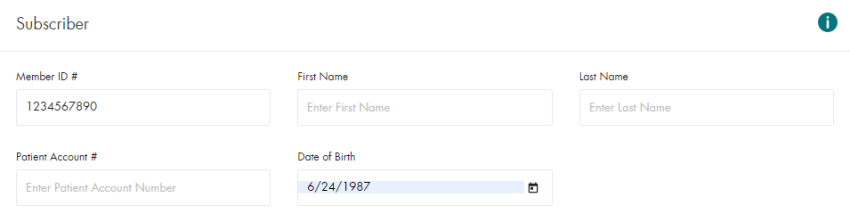
- The Member Number and DOB are required.
- The Diagnosis Code is required.
-
If the Servicing Provider is not certified for the Diagnosis Code, the response will
come back indicating they are not certified and that it will require medical review.
- This is still a valid response from the payer.
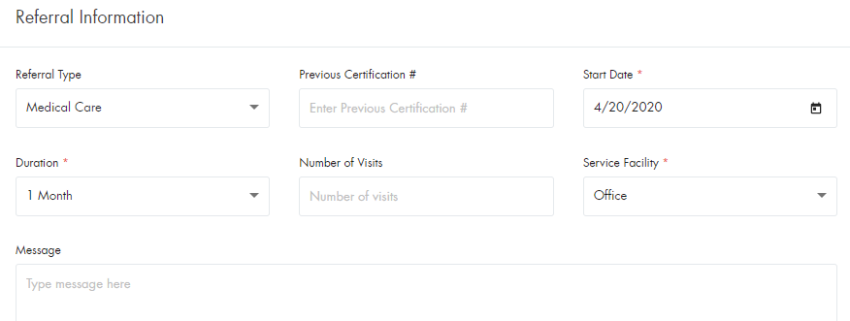
- The required fields under Referral Information are defaulted to commonly submitted values.
- Additional information can be found in the Referral Request Tip Sheet
Submitting a Simple Referral Request
- Click on Referral Request in the HEALTHeNET menu

- Select the Payer from the drop-down

- Select the Requesting Provider

- Search For / Select the Service Provider

- Enter the Member Information
- Enter a Diagnosis Code
Note: It can be searched by code or description
Ex – Code: Z86.11 / Description: Personal history of tuberculosis

- Referral Information is required, but is defaulted to common values
- Click on the SUBMIT button

Submitting a Referral Request with Related Causes
- Click on Referral Request in the HEALTHeNET menu
- Select the Payer from the drop-down
- Select the Requesting Provider
- Search For / Select the Service Provider
- Enter the Member Information
- Enter a Diagnosis Code
Note: It can be searched by code or description
Ex – Code: Z86.11 / Description: Personal history of tuberculosis
- Referral Information is required, but is defaulted to common values
- Add in the Related Cause details
Note: Auto Accident requires the Country and State of the accident

- Click on the SUBMIT button
Conclusion
This document covers the basic use cases for the Referral Request screen and the required fields for each.
There are additional request fields included on the screen that can be
included to assist the payer with processing the request.